
WordPress Powers More Than 40% of the Web. That Is Not an Accident.
WordPress is the most widely used content management system on the planet. More than 40% of all websites run on it — from personal blogs to Fortune 500 company sites to the website you are reading right now. That kind of market dominance does not happen by accident. The platform is genuinely flexible, genuinely powerful, and has an ecosystem of developers, designers, themes, and tools that nothing else comes close to matching.
I want to be clear about my position before going further: I am not anti-WordPress. I built this site in WordPress deliberately — not because it was the easiest option, but because I wanted to demonstrate that WordPress, built correctly, can perform at the highest level. The result is a site that scores 100 across all four categories in Google’s own Lighthouse performance and SEO measurement tool. Performance. Accessibility. Best Practices. SEO. All 100.
That is not a typical WordPress result. And understanding why it is not typical is the most useful thing I can tell any business owner who is evaluating WordPress for their site or wondering why their existing WordPress site is not performing.
When WordPress Is Used Correctly, It Is One of the Best Tools Available.
The best use of WordPress is one where the roles are clearly defined and respected. A developer builds the foundation — the architecture, the templates, the performance infrastructure, the SEO structure — and then hands the business owner a content system they can actually use without needing to understand what is running underneath it. The business owner adds a blog post, updates a page, uploads an image. The developer’s work handles everything else.
This is WordPress doing exactly what it was designed to do. The developer creates the page structure — service pages, location pages, landing pages — all built correctly and optimized from the start. The business then has a system for adding and managing content within that structure without touching the architecture. New blog posts, updated team pages, seasonal promotions — all manageable by someone with no technical background, inside a framework that a technical professional built to perform.
WordPress also has genuine SEO advantages when built correctly. The URL structure is fully controllable. The content hierarchy is flexible. The platform integrates cleanly with Google Search Console and other tools. And because it is so widely used, the support ecosystem — hosting environments, caching layers, CDN integrations — is mature and well-developed.
- Developer builds the structure and performance foundation — business owner manages content
- Full control over URL structure, page hierarchy, and site architecture
- Mature hosting ecosystem with excellent caching and CDN support
- Enormous developer community and long-term platform stability
- Flexible enough to power everything from simple blogs to complex custom applications
WordPress Is the Visual Studio of Website Builders. The Visual Layer Hides Everything Underneath.
Visual Studio — Microsoft’s development environment — has a drag-and-drop designer that lets non-developers build interfaces visually. It works. You can produce something that looks right and functions adequately without writing a line of code. But the underlying code it generates can be a mess, and the person who only used the visual layer has no idea why things break, why performance suffers, or how to fix what goes wrong.
WordPress is exactly that for websites. The visual layer — page builders, themes, the block editor — allows someone with no web development background to produce a website that looks professional. And that is genuinely useful in many contexts. But it creates a widespread and serious problem: a large proportion of the people building WordPress sites are not actually web developers. They are people who learned to use the visual layer, and they have no working knowledge of what is running underneath it.
The internet has been full of this reality for twenty-five years. From the earliest days of visual website builders to today, there has always been a steady stream of people searching “how do I make WordPress do X” or “why did my WordPress site break after an update.” That is not a criticism — learning by searching is legitimate and it is how the industry works. But a business website that ranks, converts, and represents a company professionally cannot be maintained on a diet of forum answers and trial and error.
WordPress in the wrong hands is not a website. It is a liability waiting to happen.
Plugins Are Where Most WordPress Sites Go Wrong. And Most People Never See It Coming.
Plugins are WordPress’s greatest strength and its most common point of failure. There is a plugin for almost everything — SEO, caching, forms, galleries, sliders, booking systems, popups, social sharing, security, backups, analytics. The plugin ecosystem is enormous and much of it is genuinely useful. The problem is that every plugin is someone else’s code, maintained on someone else’s schedule, that can conflict with other plugins, break on a WordPress core update, introduce security vulnerabilities, and add page weight that destroys performance — all without any visible warning to the person who installed it.
A WordPress site with fifteen plugins installed by someone who does not understand what each one is doing to the page load, the database, and the overall site architecture is not a well-built website. It is a collection of dependencies held together by luck and inertia. When something breaks — and something always eventually breaks — the person responsible for the site often has no idea where to start.
Security is the ugliest part. WordPress’s popularity makes it the most targeted platform for automated attacks. Outdated plugins with known vulnerabilities are the most common entry point. A site that is not actively maintained — core updates applied, plugins reviewed, security monitored — is not a matter of if it gets compromised, but when.
- Every plugin is third-party code that can conflict, break, or introduce vulnerabilities
- Plugin conflicts after WordPress core updates are one of the most common site failure points
- Excess plugins add page weight that directly damages performance and SEO scores
- Outdated plugins are the most common WordPress security vulnerability
- Most site owners have no visibility into what their plugins are doing to performance
WordPress Built Correctly Scores 100 on Google’s Own Performance Tool.
Lighthouse is Google’s open source tool for measuring website performance, accessibility, best practices, and SEO. It is built into Chrome DevTools and powers Google PageSpeed Insights. When Google evaluates your site’s page experience as a ranking factor, Lighthouse is the measurement framework behind it. A perfect score is not common. On WordPress, it is rare.
This site — built in WordPress — scores 100 in all four categories. Not because WordPress makes that easy, but because the site was built with performance as a primary requirement from the first line of code. Lean custom theme, no unnecessary plugins, optimized asset loading, proper image handling, clean semantic HTML, and an architecture designed to give search engines exactly what they need to evaluate and rank the content.
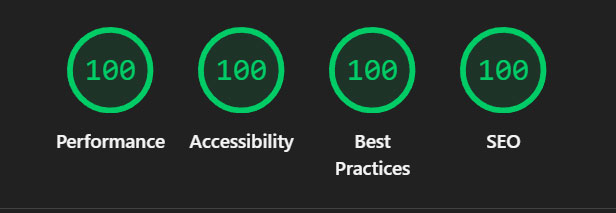
That result is achievable on WordPress. It requires knowing what you are doing — which means understanding not just the visual layer but the code, the server configuration, the asset pipeline, and the SEO architecture underneath it. The platform does not produce this result. The build does.
Wix, Squarespace, and Square Have Their Place. They Also Have a Ceiling.
Wix, Squarespace, Square, and similar hosted platforms are legitimate tools. For a small business that needs a clean, functional web presence and does not have the budget or need for a custom WordPress build, these platforms can absolutely get the job done. They handle hosting, security, and updates automatically, which removes real maintenance burden. For the right use case, they are a reasonable choice.
The ceiling is real though. These platforms trade control for convenience. URL structure, site architecture, server configuration, custom functionality, and deep SEO optimization are all constrained by what the platform allows. You are building inside someone else’s system — and when you need to do something that system was not designed for, you are either blocked entirely or working around limitations that a custom WordPress build would not have.
The SEO ceiling is the most significant limitation for businesses that are serious about search visibility. The platforms have improved considerably over the years and basic SEO is manageable on all of them. But the level of technical SEO optimization available on a properly built WordPress site — schema, custom URL architecture, server-level performance tuning, precise control over crawl signals — is simply not available on hosted platforms. For a business where search visibility is a meaningful revenue driver, that gap matters.
- Hosted platforms are valid for simple use cases and limited budgets
- Security, hosting, and updates are handled automatically — real operational simplicity
- URL structure, site architecture, and technical SEO are constrained by the platform
- Custom functionality beyond the platform’s feature set is limited or impossible
- For businesses where SEO drives revenue, the technical ceiling is a meaningful disadvantage
If Your WordPress Site Is Not Performing, That Is a Build Problem — Not a Platform Problem.
I work with businesses in Fort Wayne and across the country on WordPress sites at every stage — new builds, takeovers of existing sites, performance and SEO remediation on sites that were built without those things in mind. The platform is almost never the problem. The build is.
A slow WordPress site can be made fast. An insecure one can be hardened. One built without SEO in mind can be restructured — though as I have written elsewhere, that remediation always costs more than building it correctly from the start. A business owner who has been managing their own WordPress site on a diet of plugin installs and forum answers now has a site that works well enough but is not competing in search the way it should. That is fixable.
What I will not do is replace a working WordPress site with a different platform just because it is easier. WordPress is the right tool for most business websites when it is built and maintained correctly. The goal is to get it there — clean architecture, lean codebase, proper SEO foundation, and a content management system the business can actually use without needing a developer for every update.
WordPress is not the problem. Bad WordPress is the problem. And bad WordPress is fixable.